
How to Make Your Website Appear in Google AI Overviews
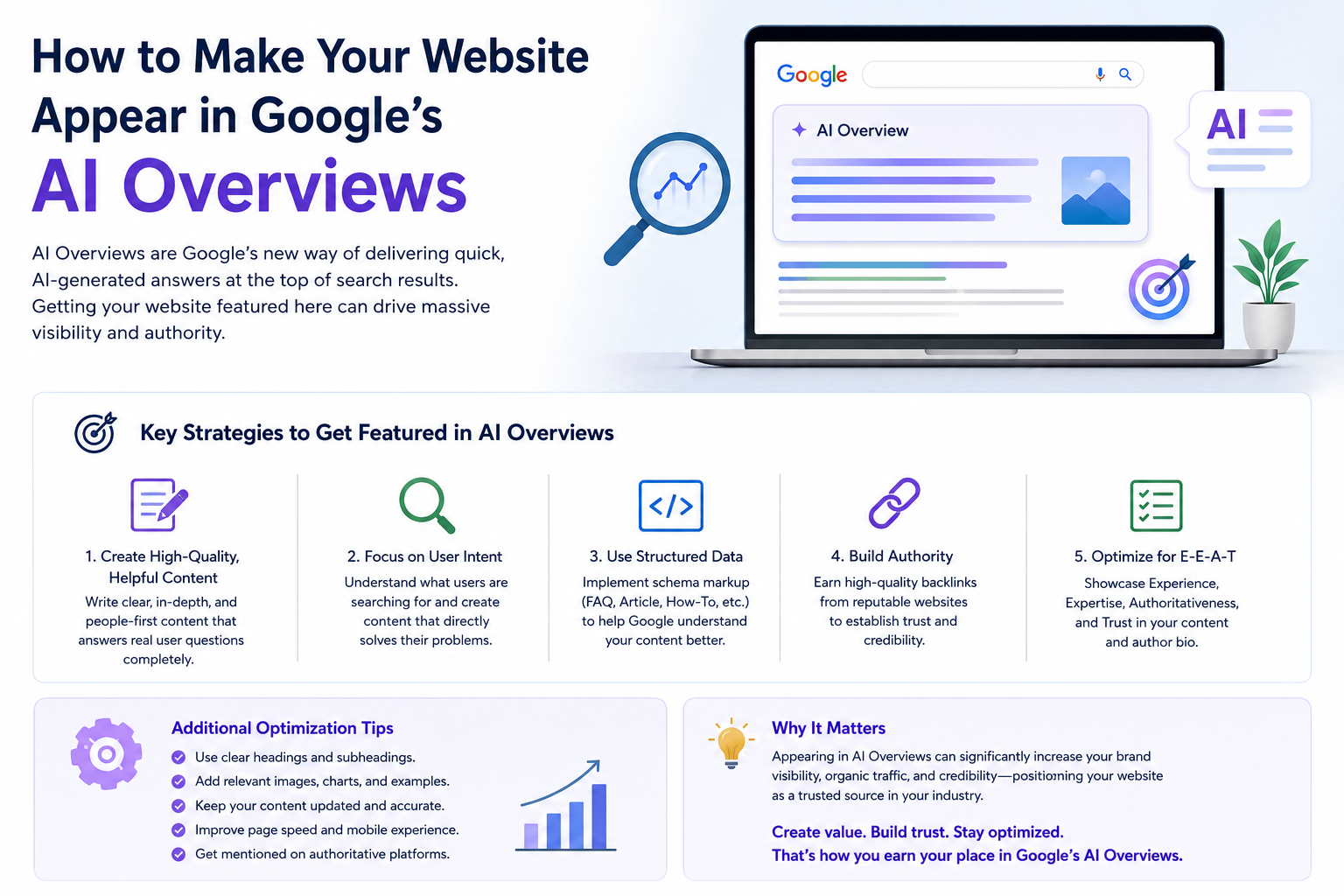
Google Search is changing quickly. Instead of showing only traditional search results, Google can now provide AI-generated summaries for many complex questions through AI Overviews. These summaries can include links to websites that Google considers useful and relevant.
For businesses, this creates a new opportunity to reach potential customers. But appearing in an AI Overview is not something you can guarantee with one SEO trick. The best approach is to create helpful, original, trustworthy content while maintaining strong technical SEO.
In this guide, we’ll explain practical ways to improve your website’s chances of being discovered and referenced in Google’s AI-powered search experiences.
What Are Google AI Overviews?
Google AI Overviews provide users with an AI-generated summary at the top of some search results. The summary can bring together information from multiple sources and provide links that users can visit to learn more.
For example, someone might search:
“How can a small business improve its online presence?”
Instead of simply displaying a list of websites, Google may provide a short AI-generated explanation followed by links to relevant sources.
This means your goal should not be to write content only for traditional rankings. You should create content that clearly answers the questions your audience is actually asking.
Can You Guarantee a Spot in Google’s AI Overviews?
No.
Google does not provide a guaranteed method for getting a page included in an AI Overview. Google says its AI search experiences continue to rely on the same core principles that support Search generally, including useful, original content and good technical accessibility.
Instead of trying to “hack” AI Overviews, focus on making your website a reliable and useful source of information.
1. Create Helpful, Original Content
The first step is simple: create content that genuinely helps your audience.
Avoid rewriting the same information that is already available on hundreds of other websites. Add something useful from your own experience, research, examples, data, processes, or expertise.
For example, instead of writing:
“What is SEO?”
you could create:
“SEO for Small Businesses: A Practical 2026 Guide to Getting More Local Customers”
The second topic gives you more opportunities to answer specific questions and provide practical information.
Google recommends creating unique, satisfying content for people rather than content created primarily to attract search-engine traffic.
2. Answer Specific Questions Clearly
AI-powered search often deals with longer and more detailed questions.
Build content around questions your customers actually ask.
For example:
-
- What is SEO and how does it work?
-
- How much does SEO cost for a small business?
-
- How can I improve my Google ranking?
-
- How does Google Ads work?
-
- What is technical SEO?
-
- How can social media help a business?
-
- How can I get more leads from my website?
Use these questions as headings and answer them directly.
A good structure is:
What Is Technical SEO?
Technical SEO is the process of improving the technical parts of a website so that search engines can crawl, understand, and index its pages effectively.
Then expand with examples, benefits, and practical steps.
This makes the content easier for both users and search systems to understand.
3. Use a Clear Content Structure
Well-organized content is easier to read and understand.
Use:
-
- One clear H1 heading
-
- Descriptive H2 headings
-
- H3 headings where necessary
-
- Short paragraphs
-
- Bullet points
-
- Numbered steps
-
- Tables where useful
-
- Examples
-
- FAQs
Avoid large blocks of text.
For example:
How to Improve Your Website for Google AI Overviews
-
- Publish useful content.
-
- Answer specific questions.
-
- Improve technical SEO.
-
- Add relevant structured data.
-
- Use original images and videos.
-
- Build your website’s authority.
-
- Monitor your Search performance.
A clear structure helps visitors find answers quickly.
4. Focus on Google AI Overviews Keywords
Long-tail keywords are more specific search queries.
Instead of targeting only:
digital marketing
you could target:
best digital marketing company for small businesses
or:
how digital marketing helps small businesses get more customers
Long-tail keywords often represent a clearer search intent.
Create dedicated content around the questions and problems your target audience is searching for rather than repeatedly inserting the same keyword.
5. Build Topic Authority
One article is rarely enough to demonstrate strong expertise around a broad subject.
Instead, create a group of related articles.
For example, if your main topic is SEO for small businesses, you could create supporting articles such as:
-
- What Is SEO for Small Businesses?
-
- Local SEO Guide for Small Businesses
-
- Technical SEO Checklist
-
- On-Page SEO Best Practices
-
- How to Find SEO Keywords
-
- How to Improve Google Business Profile Visibility
-
- Common SEO Mistakes Small Businesses Make
Then link these articles together.
This creates a useful content ecosystem and helps visitors explore the topic in greater depth.
6.
Your content cannot perform if Google cannot properly access and understand your website.
Check important technical factors such as:
-
- Website crawlability
-
- Indexability
-
- Mobile usability
-
- Page speed
-
- HTTPS
-
- Internal links
-
- XML sitemap
-
- Robots.txt
-
- Canonical URLs
-
- Broken links
-
- Proper status codes
Google specifically recommends ensuring that Googlebot can access your pages, that pages return successful HTTP responses, and that important content is indexable.
7. Use Structured Data Correctly
Structured data gives search engines additional information about the content of a page.
Depending on the page type, you may use relevant Schema.org structured data such as:
-
- Organization
-
- LocalBusiness
-
- Article
-
- BreadcrumbList
-
- Product
-
- Service
However, structured data should accurately represent information that users can see on the page.
Google recommends that structured data match the visible content and follow its guidelines.
Important: Do not add irrelevant or misleading schema simply because you think it will increase your chances of appearing in AI Overviews.
8. Add Original Examples and Experience
One of the best ways to make content more valuable is to include information that isn’t just copied from other websites.
For example, a digital marketing agency can include:
-
- Real campaign examples
-
- SEO processes
-
- Before-and-after improvements
-
- Lessons learned
-
- Industry-specific strategies
-
- Practical checklists
-
- Original research
-
- Screenshots where appropriate
Instead of simply explaining what SEO is, show readers how you actually approach SEO for a business.
This makes your content more useful and gives visitors a reason to trust your expertise.
9. Use Images and Videos
Don’t make your website completely text-based.
Google’s guidance also encourages supporting textual content with high-quality images and videos, particularly as Search becomes more multimodal.
For a digital marketing website, you could use:
-
- SEO diagrams
-
- Google Ads screenshots
-
- Analytics examples
-
- Infographics
-
- Short tutorial videos
-
- Process illustrations
-
- Original charts
Make sure images have descriptive, relevant alt text.
10. Improve Your Website’s Trust Signals
People want to know who is behind the information they read.
Make your website more trustworthy by providing:
-
- An About page
-
- Author information
-
- Contact information
-
- Business details
-
- Client testimonials
-
- Case studies
-
- Privacy policy
-
- Clear service information
-
- Links to relevant professional profiles
For businesses, Google also recommends establishing your official presence through tools such as Search Console and, where applicable, a Google Business Profile.
11. Don’t Create Hundreds of AI-Generated Articles
AI can be useful for research, brainstorming, outlining, and improving content. But publishing large amounts of generic AI-generated content without adding real value can hurt your overall content quality.
Google’s guidance says generative AI itself isn’t automatically a problem. The issue is using automation to create content primarily to manipulate search rankings or publishing content that lacks originality, accuracy, quality, or relevance.
Use AI as a tool—not as a replacement for expertise.
Before publishing an AI-assisted article, add:
-
- Your own examples
-
- Expert insights
-
- Original research
-
- Accurate information
-
- Relevant statistics
-
- Practical recommendations
-
- Human editing
12. Keep Your Content Updated
Digital marketing changes quickly.
An article written several years ago may contain outdated strategies, tools, or Google features.
Review important content regularly and update:
-
- Statistics
-
- Screenshots
-
- SEO recommendations
-
- Tools
-
- Examples
-
- Internal links
-
- Dates
-
- Industry developments
Don’t update an article just to change its publication date. Update it when you have genuinely improved the information.
13. Use Google Search Console
Google Search Console is one of the most useful tools for monitoring your website’s organic visibility.
Use it to check:
-
- Search queries
-
- Impressions
-
- Clicks
-
- Average position
-
- Indexed pages
-
- Technical issues
-
- Search performance
As of 2026, Google has also introduced dedicated Search Console reporting for generative AI visibility, including impressions and pages appearing in AI features, although the new reporting is being rolled out to a subset of websites.
This can help businesses understand whether their pages are appearing in Google’s generative AI experiences.
14. Think About Search Intent, Not Just Keywords
Keywords are important, but search intent is even more important.
Someone searching:
“SEO”
may be looking for a definition.
Someone searching:
“SEO services for small business”
may be looking for a service provider.
Someone searching:
“how to do SEO for a small business website”
may be looking for a tutorial.
Your content should match what the searcher actually wants.
15. Create Content That Deserves to Be Cited
Think about this question:
“If Google needs a reliable source for this question, why would it choose my page?”
Your answer should be your content quality.
Create pages that:
-
- Provide clear answers
-
- Explain concepts simply
-
- Include original insights
-
- Support claims with reliable information
-
- Demonstrate experience
-
- Solve real problems
-
- Are easy to navigate
-
- Are technically accessible
The goal isn’t to write for an AI. The goal is to create such useful content that both people and search systems can understand its value.
Final Thoughts
Getting your website into Google’s AI Overviews isn’t about finding a secret SEO shortcut. Google’s current guidance emphasizes the fundamentals: helpful content, originality, strong technical SEO, clear structure, trustworthy information, and a good user experience.
For businesses like Digital Priya, this means creating content around real customer questions, building authority around digital marketing topics, improving technical SEO, using structured data correctly, and continuously updating valuable resources.
AI-powered search is changing how people discover information, but one principle remains the same:
Create useful content for people first, and optimize it so search engines can understand it.
Quick Checklist
-
- Create original, people-first content
-
- Answer specific customer questions
-
- Target relevant long-tail keywords
-
- Use clear H1, H2, and H3 headings
-
- Improve technical SEO
-
- Make important pages crawlable and indexable
-
- Use relevant structured data correctly
-
- Add original images and videos
-
- Build topical authority with related content
-
- Add trustworthy business and author information
-
- Avoid mass-produced, low-value AI content
-
- Keep important content updated
-
- Monitor performance in Google Search Console
Remember: There is no guaranteed formula for appearing in an AI Overview. The strongest long-term strategy is to publish genuinely useful, original information and make your website easy for Google to crawl, understand, and trust.